Product Replacement Tool - Add Attachment to Monitor Page
Topics:
- Add an attachment to the monitor page of the Product Replacement tool
- Product Replacement tool adding attachment to the monitor page
- Add an attachment to the PRT monitor page
Answer:
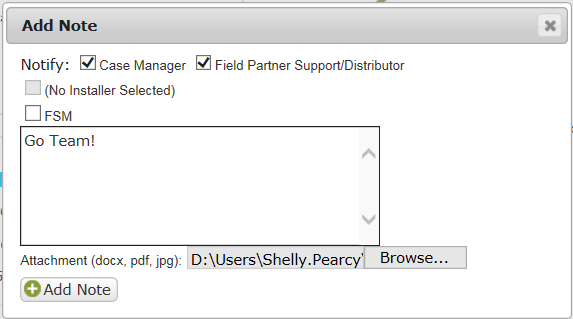
In order to add an attachment from the Monitor page of the Product Replacement tool:
- Click Add Note.
- Select participants to notify.
- Click Browse, add attachment.
- Include note in the notes field (this is required).
- Click Add Note.
See also:
DID THIS ANSWER YOUR QUESTION?

We're standing by with answers
Whether you're shopping for appliances or have questions about those you already own, we've got the resources you need. Talk directly to a customer care expert at the Sub-Zero, Wolf, and Cove service center, or connect with an appliance consultant at an official showroom near you. Get quick answers online, or reach a certified service provider or installer. And much more.
Call us at (800) 222-7820