Wolf EC2450 and EC3050 Coffee System Control or Display Not Working
Topics:
- EC2450 Coffee System Display is blank
- Controls do not respond
- EC3050 will not work
Troubleshooting
If the controls for the Coffee System are not working, or the display is blank:
- Verify the product is turned on.
- Slide the product forward and press the main power button.
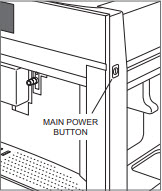
- If the screen shows the Wolf logo and then goes blank, press the Standby switch to activate the touchscreen.
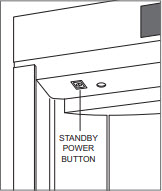
- Slide the product forward and press the main power button.
- Turn the home circuit breaker to the product off for 30 seconds then back on again.
- Retest the product operation. If the product operates without any further errors, no action is required.
- If these troubleshooting steps do not resolve the issue, service is necessary to expertly diagnose and repair the product. Contact Factory Certified Service to schedule an appointment for repair.
DID THIS ANSWER YOUR QUESTION?

We're standing by with answers
Whether you're shopping for appliances or have questions about those you already own, we've got the resources you need. Talk directly to a customer care expert at the Sub-Zero, Wolf, and Cove service center, or connect with an appliance consultant at an official showroom near you. Get quick answers online, or reach a certified service provider or installer. And much more.
Call us at (800) 222-7820